2025 Release Wave 2: What’s new in Microsoft Fabric

Dec 15, 2025
  • IT
  • Microsoft

Microsoft Fabric continues to mature: simpler integrations, tighter security, and governance that scales with your organization. Here’s what changed and how it helps teams move faster with less risk.
Want the Power BI details? Our companion blog has all the highlights.

Data Integration (Data Factory & Pipelines)

SAP staging: SAP Datasphere + Microsoft Fabric shortcuts

Extracting data from SAP without disrupting your operations used to be a challenge. Now, SAP Datasphere sends data straight to Azure Data Lake Gen2, and Fabric reads it without copying.

Why it matters: Faster, cheaper, no redundant copies, and near-real-time updates. No more manual exports or duplicate storage.

Read more on Microsoft's website


Microsoft Dataverse + Fabric: sync only what you need

Big improvements make the link between Fabric and Dataverse more efficient and secure:

  • Manage Tables: Pick only the data that you want, resulting in lower storage costs and simpler data management for your team.
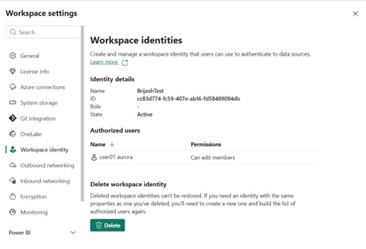
  • Workspace Identity / Service Principal: More secure and less day-to-day management than passwords.
  • Fast Fabric rollout: Business dashboards and reports now update in under 15 minutes. This update will automatically be deployed early 2026 - or your IT team can disconnect and reconnect the Fabric link to start using this feature now. Learn how to on Microsoft's website.

Read more on Microsoft's website


OneLake & Data Catalog

OneLake Security (preview)

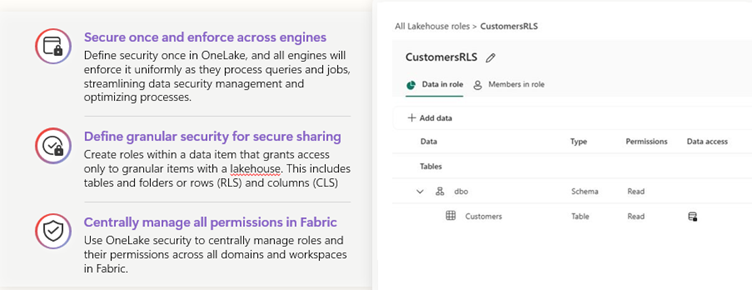
Fabric now gives you more precise control over who sees what in your Lakehouse. Instead of broad workspace permissions, you can create custom roles that define exactly which data a user or group can access, and how. This feature strengthens governance and protects sensitive data while still enabling collaboration across teams.

What’s possible?

  • Role-based permissions: Grant read or write access to selected data assets.
  • Granular scope: Apply security at multiple levels:
    • Folder-level: Restrict access to specific folders.
    • Table-level: Limit access to certain tables.
    • Column-level: Hide sensitive fields like PII.
    • Row-level: Filter data so users only see rows that match defined conditions.
  • Combine roles: Users can belong to multiple roles; permissions stack automatically.
  • Automatic enforcement: Security rules apply during queries, no manual filtering needed.

Read more on Microsoft's website


Domains & tags: find the right data faster

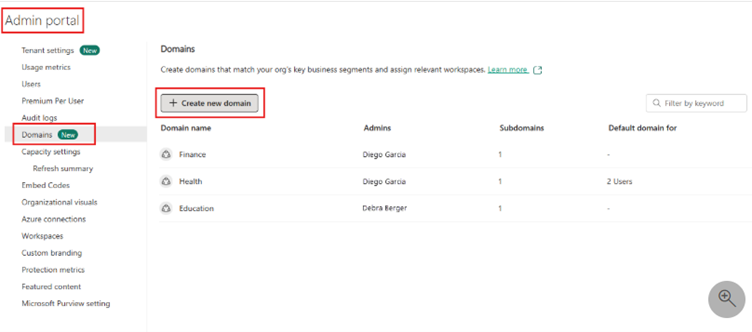
Organize your estate by business domain (Finance, Sales, etc.), then use tags and the OneLake catalog to help people discover what they need in seconds. The catalog also provides governance views so data owners can see where to add descriptions, endorsements, or retire stale assets.

Read more on Microsoft's website


Platform & Governance

Workspace-level Private Links

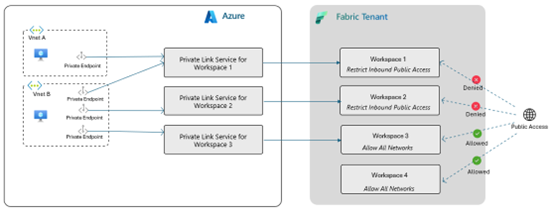
Secure specific workspaces behind Azure Private Link so only approved VNets can reach them, and no public Internet paths. Perfect for confidential analytics or regulated workloads, without locking down the entire tenant.

Read more on Microsoft's website


Wrapping up

Fabric’s new updates center on productivity (easier SAP and Dataverse paths), security (OneLake roles, Private Links), and findability (domains, tags, and catalog). Together, they reduce duct‑tape work so teams can focus on value.

Need help?

From first pilots to enterprise governance, we can help you design the right setup - secure, scalable, and ready for AI. Want to explore these features in your own environment or need help getting started? We’re happy to guide you.


Related content